Search real web-app screens, flows and sections. Then install them.
Connect Claude, ChatGPT, Codex, Cursor and other MCP clients to the Proper UI library. Every result is a real component with source, so the agent can install what it found. Free, open source, no account.
https://properui.dev/api/mcpMIT licensed. No sign-in, no API key. Remote URL or local package.
What your agent can do with it
Five jobs the library is good for, each backed by one tool.
Research a screen
Describe the page you need and review ranked options with thumbnails, before anything is installed.
search_screensFollow a flow
Find a sign up, onboarding or billing journey and read each step in order, with its purpose.
search_flowsCompare approaches
Put two to five candidates side by side: the components and tokens they share, and the ones only one of them uses.
compare_screensFind a section
Look through marketing section variants for the hero, pricing block or footer that fits the page.
search_sectionsInstall what you found
Get the files and packages a choice would add. Over stdio the agent installs it; over HTTP it runs the CLI.
add_component or get_install_plan
What your agent can search
Four searchable collections, one tool each. Ask in plain language and get ranked results, or an honest no match.
Screens
233 full pages
Dashboards, settings, auth, onboarding, billing, informational pages, 404s and email templates, each a complete page you can install.
search_screensFlows
13 ordered sequences
Multi-step journeys such as sign up, onboarding and billing, built only from screens that exist, with each step's purpose named.
search_flowsSections
446 marketing variants
Heroes, pricing, features, testimonials, FAQs, footers and the rest of a marketing site, one variant per layout.
search_sectionsComponents
89 component groups
The base and application components that screens and sections are built from, with props and docs links.
search_components
What results contain
Each result carries what an agent needs to compare options and act on one. The fields below come straight from the registry, so nothing is invented at query time.
Thumbnail
A rendered image of the screen or section, light and dark where available, so the agent can look before it chooses.
Name and layer
The registry name and the layer it lives in, such as app-examples or marketing.
Docs and preview links
The documentation page and a live preview you can open in a browser.
Composes with
The components the entry is built from, so you can see what installing it pulls in.
Semantic tokens
The token contract the entry uses, so the result stays correct in light, dark and right to left.
Install command
The exact CLI command.
get_install_planlists the files and npm packages before anything is written.
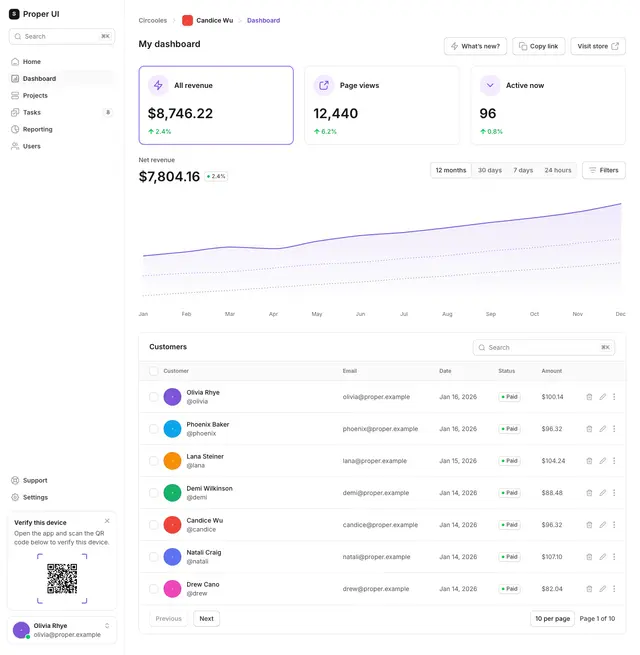
{
  "name": "dashboard-04",
  "title": "Dashboard 04",
  "layer": "app-examples",
  "thumbnail": "/thumbs/app-examples/dashboards/dashboard-04.webp",
  "docs": "https://properui.dev/components/dashboards/dashboard-04",
  "composes_with": ["app-navigation", "charts", "metrics", "table", "tabs"],
  "token_contract": ["bg-primary", "border-secondary", "text-primary", "text-tertiary"],
  "add": "npx @properui/cli@latest add dashboard-04"
}Set up in your client
Pick your client and copy the command. The remote URL needs nothing installed. The local package runs in your project, so the agent can install what it finds.
Claude Code
One command registers the remote server. Add --scope user to make it available in every project. Use the second command to run the server locally, so add_component can install into your project.
claude mcp add --transport http properui https://properui.dev/api/mcpclaude mcp add properui -- npx -y @properui/mcp- Run one of the commands below in your terminal.
- Inside Claude Code, run
/mcp(orclaude mcp listin the shell) to confirmproperuishows as connected. - Ask for a screen:
Search Proper UI for a billing settings page, show me three options, then plan the install.
Syntax checked against Claude Code MCP documentation.
Also install the Skill
The Skill tells your agent when and how to use Proper UI, including to search with the MCP first. Install it with the CLI, or with the skills registry for agents the CLI does not target. It reaches 75+ agents through skills.sh.
npx @properui/cli@latest agent initnpx skills add properui/properuiHow to use it well
Research first, then install. The agent gets a better result when it looks at several options before it commits to one.
Say what you are building
Name the screen, flow or section, and who it is for. A billing page for a self-serve SaaS needs different things from one for an enterprise admin.
Search and review several results
Ask for three to five options, not the first match. Compare the thumbnails and what each composes with before you choose.
Inspect with
get_componentRead the entry's files, dependencies and docs link. Open the source only for the one you are likely to use.
Plan with
get_install_planSee the files that will be written and the npm packages that will be needed. Nothing has changed in your project yet.
Install, then adapt
Over stdio,
add_componentwrites the files. Over HTTP, the agent runs the CLI command from the plan. Then replace the placeholder copy and data with yours, and keep the semantic tokens.
Honest limits
This is a library of buildable references, not a catalogue of shipped products. Use it with that in mind.
- Examples ship with placeholder data and demo assets. Replace them before anything reaches a user.
- Sections are compositions from one design system. They are not screens captured from shipped products.
- Every component passes axe in tests, but accessibility has to be evaluated in your real page, with your content and your flows.
- Results are starting points. A pattern appearing in the library is not proof that it is right for your users.
- The remote endpoint cannot see your project, so it cannot install files or check tokens. Use the local package, or run the CLI command from
get_install_plan.
Frequently asked questions
Is it free?+
Yes. Proper UI is MIT licensed and the MCP is part of it. There is no paid tier and no usage plan.
Do I need an account?+
No. There is no sign-in, no OAuth step and no API key. Add the URL to your client and it works.
Does it write files?+
It depends on how you connect. The remote endpoint never writes: it searches, inspects and plans, and your agent runs the CLI through its own shell tool, so each file write goes through the approval your client already asks for. The local stdio package runs in your project, so its add_component tool installs the files itself, the same way properui add would.
Are there rate limits?+
Fair use. There is no per-user quota today. For heavy or automated use, run the local stdio package against a copy of the registry instead.
Remote or local?+
Start with the remote URL: nothing to install, and it works in ChatGPT, Claude on the web and every client below. Choose the local stdio package when you want the agent to install straight into your project through add_component, when your client has no remote support, or when you need an offline registry.
Does it work offline?+
Yes, through the local stdio package: npx -y @properui/mcp --registry <directory> reads a local copy of the registry instead of properui.dev.
What data is sent?+
Only the tool arguments your agent passes, such as a search query. Your code, your files and your identity are never sent, and the server has no telemetry. The only usage signal is the aggregate request analytics Cloudflare provides for the endpoint.
How is it different from the CLI?+
The CLI installs. The MCP helps an agent decide what to install: it searches screens, flows and sections with thumbnails and links, then produces an install plan. Both read the same registry. Over stdio the MCP can run the install itself; over HTTP it hands the final step to the CLI.
How is it different from the Skill?+
The Skill is a set of instructions that lives in your repository and tells an agent how to work with Proper UI. The MCP is a tool the agent can call to search the library. They work together: when the MCP is connected, the Skill tells the agent to use search_* and get_component before the CLI.
Give your agent a library to search.
Add the endpoint once. Then ask for a screen, a flow or a section, and install the one you pick.
https://properui.dev/api/mcp